
How do I sign up for a Free Trial with CLiX?
Experience CLiX with a free trial—no commitments, no fees! We’ll provide you with a complimentary toll-free number, and you’re in control of payments—only pay when it suits you. Enjoy free access to our API integrations, Email to SMS, and Web SMS tools, while you simply pay for credits as you need them. Start Today
I didn’t get an SMS Verification Code-What should I do?
When you sign up for an CXT account, we will send you an SMS verification code that you will need to enter when you first log-in to your account. If you haven’t received an SMS verification code, please see the steps below to resolve this issue.
1. Check that your mobile phone is within reception range and switched on.
Please try turning your handset off and on, ensure that it has reception and is switched on.
2. Ensure that your mobile number has the correct international format.
Our SMS Gateway delivers your SMS verification code to the mobile number that you provide on sign up, if your mobile number is formatted incorrectly (for example, without the country prefix), we will not be able to deliver the SMS to your handset.
3. Ensure that you have entered your mobile number correctly.
Is it possible that you entered an incorrect digit? If this may be the case please contact our Support Team with the correct mobile number and the username/email you provided on sign up.
4. Carrier delay – Please wait 15 minutes
On rare occasion, our carriers might be experiencing and upstream issue outside of CLiX’ s control, leading to minor SMS delays. Please try waiting for 15 minutes, and turn your mobile off and on to check if the SMS verification code has reached your handset.
5. Does CLiX support your country destination?
It could be a possibility that your country destination is not on the CLiX coverage list or fully supported. If you think this may be the case, please contact our Support Team to investigate this further.
6. Contact the CLiX Support Team
If your issue is still not resolved and you are yet to receive your SMS verification code, our friendly Support Team will be happy to resolve this for you as quickly as possible. When contacting our support team, please provide details such as:
- Account username (email used to sign up).
- Correct mobile number you wish to have associated with your account.
- Country that you're trying to sign up from.
Why can’t I log into my CLiX Account?
Here are some suggestions as to why you might be experiencing difficulty logging into your CXT account:
- Ensure that you're using the correct username and password, and that the caps lock is turned off.
- Clear your browser history and cache and try logging in again.
- Try using a different internet browser.
- If you have made too many password attempts, and you are receiving a notice stating too many failed attempts.
please contact our Support Team to help troubleshoot this issue.
Please note - If you haven’t used your account in over two years, your account may be suspended due to inactivity or inappropriate usage. If you wish to start sending again, you will need to contact our Support Team to gain access to your account again.
If submitting a ticket to our support team, please provide details such as:
- CXT username you're trying to log in with.
- The issue you're experiencing.
In what format do my mobile numbers need to be?
To ensure successful delivery, your contacts' mobile numbers must be in the correct international format.
To change mobile numbers from the domestic format to the correct international format, simply remove the first '0' or '+' of the mobile number and replace it with the relevant international code (e.g. 1 for the U.S). Incorrect formatting may result in undelivered messages or a message sent to an incorrect number. Below are some country specific examples:
U.S.
- Country Code: 1
- Number: 10 digits long, excluding the leading '0' or '+'.
- Example domestic number: 2126544321
- Example International number: 12126544321
Australia
- Country Code: 61
- Number: 9 digits long, excluding the leading '0'.
- Example domestic number: 0447973739
- Example International number: 61447973739
India
- Country Code: 91
- Number: 10 digits long, excluding the leading '0'.
- Example domestic number: 09000654321
- Example International number: 919000654321
UK
- Country Code: 44
- Number: 10 digits long, excluding the leading '0'.
- Example domestic number: 07723654321
- Example International number: 447723654321
UAE
- Country Code: 971
- Number: 8 digits long, excluding the leading '0'.
- Example domestic number: 047654321
- Example International number: 97147654321
Does CLiX support international messaging?
Yes, CLiX supports international messaging. When sending an SMS/MMS internationally, you need to ensure that your contacts are in their correct international format and using the correct Country Prefix/dialing codes. However, if you are using a short code or toll-free number, international sending may be limited. For more information, please see our Pricing Page for rates, as well as the correct mobile number format with the country specific.
What is opting-in?
Contacts must provide the correct details as well as consent to receive bulk SMS. When recipients opt-in to receive SMS, they also should be notified that they have the option to unsubscribe or opt-out of communication at any time by responding with a phrase such as 'STOP'.
What happens when a recipient opts-out?
When someone opts-out of SMS communication by responding to a text with 'Stop', our robust platform automatically assigns the contact to the opt-out list. Their contact information will still be available if they have a change of mind, but they will be taken out of the active contact lists and no longer receive SMS. Through our sophisticated reporting system, you can track how many opt-ins and opt-outs have occurred over a specific time.
How is Bulk SMS regulated?
When someone opts-out of SMS communication by responding to a text with 'Stop', our robust platform automatically assigns the contact to the opt-out list. Their contact information will still be available if they have a change of mind, but they will be taken out of the active contact lists and no longer receive SMS. Through our sophisticated reporting system, you can track how many opt-ins and opt-outs have occurred over a specific time.
How is Bulk SMS regulated?
In the U.S., the Telephone Consumer Protection Act (TCPA) lays out the official requirements for sending bulk SMS and is regulated by the CTIA. Understanding the difference between Application-To-Person (A2P) and Person-To-Person (P2P) text messaging is very important—including what types of numbers are used to send SMS for either A2P or P2P. Check out the CTIA's Messaging Principles and Best Practices as it is a thorough guide on industry standards and how to send SMS appropriately.
What are A2P and P2P?
Person-To-Person (P2P) is consumer messaging, whereby a consumer contacts one or more other consumers via message in a consistent conversation. Application-To-Person (A2P) is non-consumer messaging. Text messages sent to and from large-to-small businesses, entities and organizations are classified at A2P, including bulk SMS.
What is a virtual number?
A virtual number is a distinctive identifier assigned to an account for sending SMS online. CLiX offers dedicated virtual numbers, including toll-free, short code, and long code options
How do I acquire a virtual number?
When you join CLiX, you'll receive a toll-free number for free—yes its completely free! If you'd rather use a short code or long code, those options come with a setup fee and a monthly subscription. You can explore all available dedicated number choices, including toll-free, short code, and long code, on our Pricing Page.
For how long can I use a virtual number?
All virtual numbers are available for as long as the account user is actively using it and has paid up to date (if applicable).
What is a short code?
In the U.S., short codes are five to six-digit numbers designed specifically for A2P mobile messaging. CLiX exclusively offers dedicated short codes, ensuring that your number is uniquely yours—free from the risks that come with shared short codes
When should I use a short code?
According to the TCPA, short code is strictly used for non-consumer high traffic SMS from businesses, entities and organizations. High volume messages such as One-Time Passwords (OTP), SMS marketing campaigns, promotional texts and informative notifications are defined as A2P mobile messaging.
Why should one use a short code?
As short code is condensed to five or six digits, these numbers are highly memorable and can easily be associated with a name, brand or business. Short code is classified as a high tier service which includes benefits like an easy-to-remember number that is personalized to your business, it supports 2-way texting and also registered as an A2P number with all U.S. carriers so it is less likely to be flagged as spam or blocked for promotional content.
How does one apply for a dedicated short code?
To apply for a short code, please follow these instructions: 1. Fill out the Short Code Request Form and our team will be in touch 2. Answer the questionnaire to begin the application process - Our team will need information like your name, SMS volume, message content, your Opt-in and Opt-out process, and what platform you use to send SMS 3. Once all the appropriate information is gathered, and payment is confirmed, the supplier will process the request 4. Be patient; all U.S. carriers must activate a short code, and this can take 4-8 weeks 5. The application is complete! We will set up your short code ready to use
What does the CTIA say about short codes?
Consistent with laws and regulations, CTIA reinforces Short Code Best Practices. High on the list of these Best Practices include obtaining express consent from the consumer (opt-in), providing the option to revoke consent (opt-out), avoiding excessive and malicious content (spam) and present a clear understanding of who is sending the A2P messages (business or brand name).
How long does it typically take to acquire a short code?
The application process for a dedicated short code can take 4-8 weeks as all U.S. carriers have to activate a short code before it is useable.
What is the cost of a short code?
Dedicated short codes come at a monthly cost to the account user on top of SMS costs. To see our payment options, please visit our Pricing Page.
Can short codes be used for calls?
No, short code does not support calls. If you were interested in using a toll-free number (a number that supports both calls and text), please see our Toll-Free Number service.
What is Toll-Free SMS?
A toll-free number handles both calls and texts, making toll-free SMS the process of sending messages to and from a number that also supports voice. This is an excellent solution for businesses with high-volume customer support. If phone lines are occupied, an automated voice message can suggest a call back with SMS confirmation or initiate a text conversation about the inquiry. Likewise, a text exchange with a support team member can transition into a call when needed—all using the same number!"
What is the process to acquire a toll-free number?
Signing up for free with CLiX comes with a toll-free number—yours to use however you like. You also have the option to link an existing toll-free number to your account."
Can I add SMS to an existing toll-free number?
Absolutely! If you already have a toll-free number for calls, enabling SMS is simple. When you sign up for free with CLiX, you can link your existing number to your account, allowing you to send and receive texts with the same number.
How long does it take to set up toll-free SMS?
Just minutes are all it takes! Sign up for free with CLiX, enter your details, and receive a toll-free number—ready for immediate use at no cost
Does toll-free SMS support two-way texting?
Yes. A toll-free number offers the benefit of two-way SMS, making it especially useful for business support services. Conversations can seamlessly transition between text and phone calls, ensuring smooth and efficient customer interactions.
How is it free?
For a short time, CLiX is offering a free toll-free number upon sign-up, giving you the full experience without any commitment or risk.
How can I test CLiX’s Services?
We provide developers with a sandbox testing service, enabling them to build and refine their applications using our SMS messaging gateway. This system allows for closed-loop integration testing, where users can simulate real campaign conditions to assess code functionality and reporting features before going live. To get started, send an inquiry to our integration specialists for account setup assistance."
Is it simple to integrate with CLiX?
Yes it’s very easy. Our adaptable integrations and powerful messaging gateway seamlessly incorporate SMS into every aspect of your business—from applications and websites to intranets, CRMs, ERPs, and beyond. With years of expertise, our mobile messaging specialists excel at integrating advanced messaging solutions into existing corporate systems. If you need integration support, our dedicated Integration Specialist is ready to assist—just reach out!"
Which plugins can integrate with CLiX?
CLiX's system effortlessly integrates with diverse software across multiple industries. For more details, reach out to our Support Team with your requirements—they’ll help you create something exceptional.
White label Branding and Sub-accounts
Every CLiX user enjoys free access to sub-accounts, which function as extensions of the main account. The primary account holder can assign budgets and permissions to sub-accounts, ensuring controlled spending and efficient management. Additionally, custom site branding lets businesses tailor MXT to match their brand identity. To get started with site branding, reach out to a member of the CLiX Team.
What pricing plans & payment methods are available?
CLiX offers flexible pricing plans designed to lower your SMS rate as your spending increases. Pricing tiers are determined by the amount added to your account in a single transaction, ensuring cost-effective solutions based on usage and volume. All tiered plans include the same great features, with bigger purchases leading to lower per-message rates.
Accepted payment methods include:
• Secure online payments via PayPal
• VISA, MasterCard, and American Express
• Direct deposit (processing time of 3-5 business days)
• ACH/Wire
How does the CLiX free trial work?
When you create a CLiX account, there are no hidden fees or unexpected contracts—you're in control of your payments, choosing when and how much you pay. Our API Integrations, Email to SMS, and Web SMS services are completely free to use, with a flexible, pay-as-you-go credit system. CLiX empowers you to decide your payment plan, whether pre-paid or post-paid—it’s entirely up to you. Sign up today and enjoy a free trial with no commitments, obligations, or hidden costs—just complete flexibility.
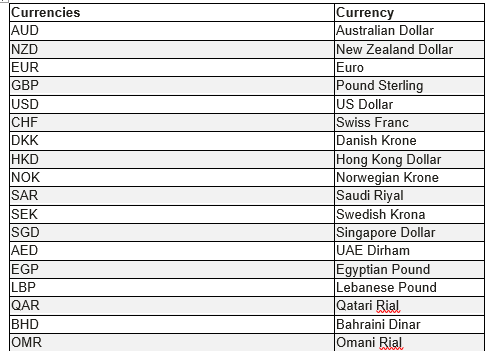
Which currency options can I use?
When opening an account, the currency will be set to the country in which you have signed up by default. E.g. if signing up in the U.S., your currency will default to USD. If you require a different currency, our Support team will be happy to assist you in updating your account to suit your requirements.
We currently offer the following currencies:.
What is the minimum purchase amount?
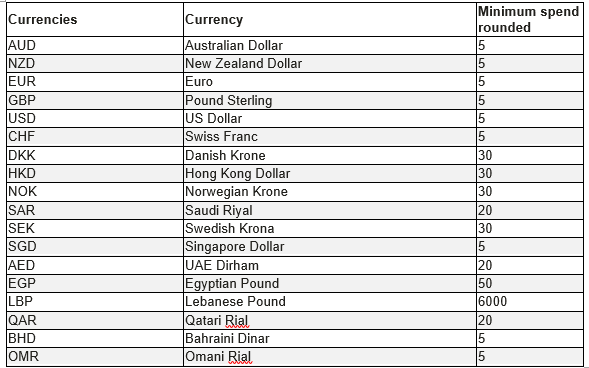
The minimum purchase requirements are as follows:
Do my credits expire after a certain date?
SMS credits will expire exactly after one year of purchase.